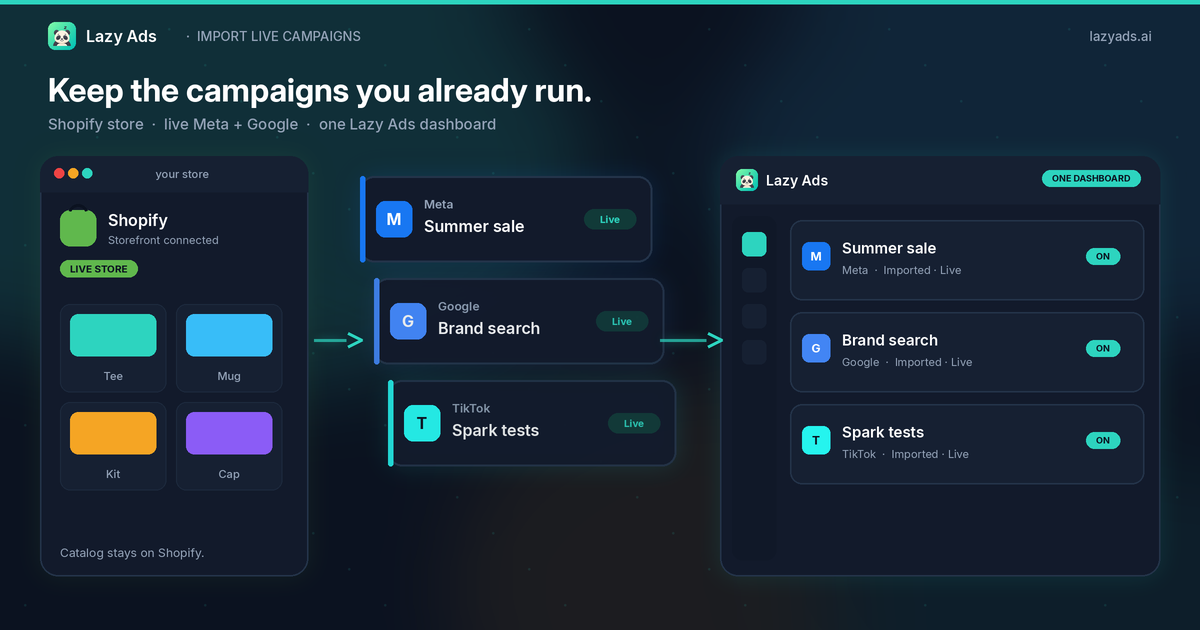
Keep the campaigns you already run.
Short answer: Yes. Lazy Ads imports the campaigns already running on Meta, Google, or any of the other seven networks it supports, and they keep running while you do it. Import links each campaign to one dashboard and a sync pulls in its ad sets and ads, so nothing on the network gets paused or rebuilt. Import starts on BYOA at $19/mo billed annually ($24 month-to-month); Starter adds Lazy Ads AI at $79/mo billed annually ($99 month-to-month). Both are a fixed monthly fee, not a cut of your ad spend.
You already have a Shopify store. You already have campaigns live on Meta and Google. The last thing that workflow needs is a new tool that asks you to start over.
Import existing ad campaigns is the other path. Connect the store. Connect the ad accounts that are already spending. Pull the live campaigns into one Lazy Ads dashboard. Then manage all nine networks from that list — or from the agent you already use.
This post is the merchant version of that sentence. What comes over. What you still set. Why a Shopify-to-ads import is not the same product as handing the store to an agency box.
You do not rebuild what is already spending
Most ad software treats a new login as a blank campaign. New name. New budget. New creative. The live work stays in Ads Manager, and the new tool becomes a second source of truth you will ignore by Thursday.
Lazy Ads is built the other way. The objects that are already running — names, status, budgets, ads — can come in. Import does not pause them. Import does not rewrite the brief. It links what is live so you can see it, sync it, and operate it from one place.
You still need your own advertiser accounts. Lazy Ads does not mint a Meta Business or a Google Ads customer for you. The store connection does not replace those accounts. It puts the catalog in the same workspace as the campaigns that already point at it.
Five things you actually do
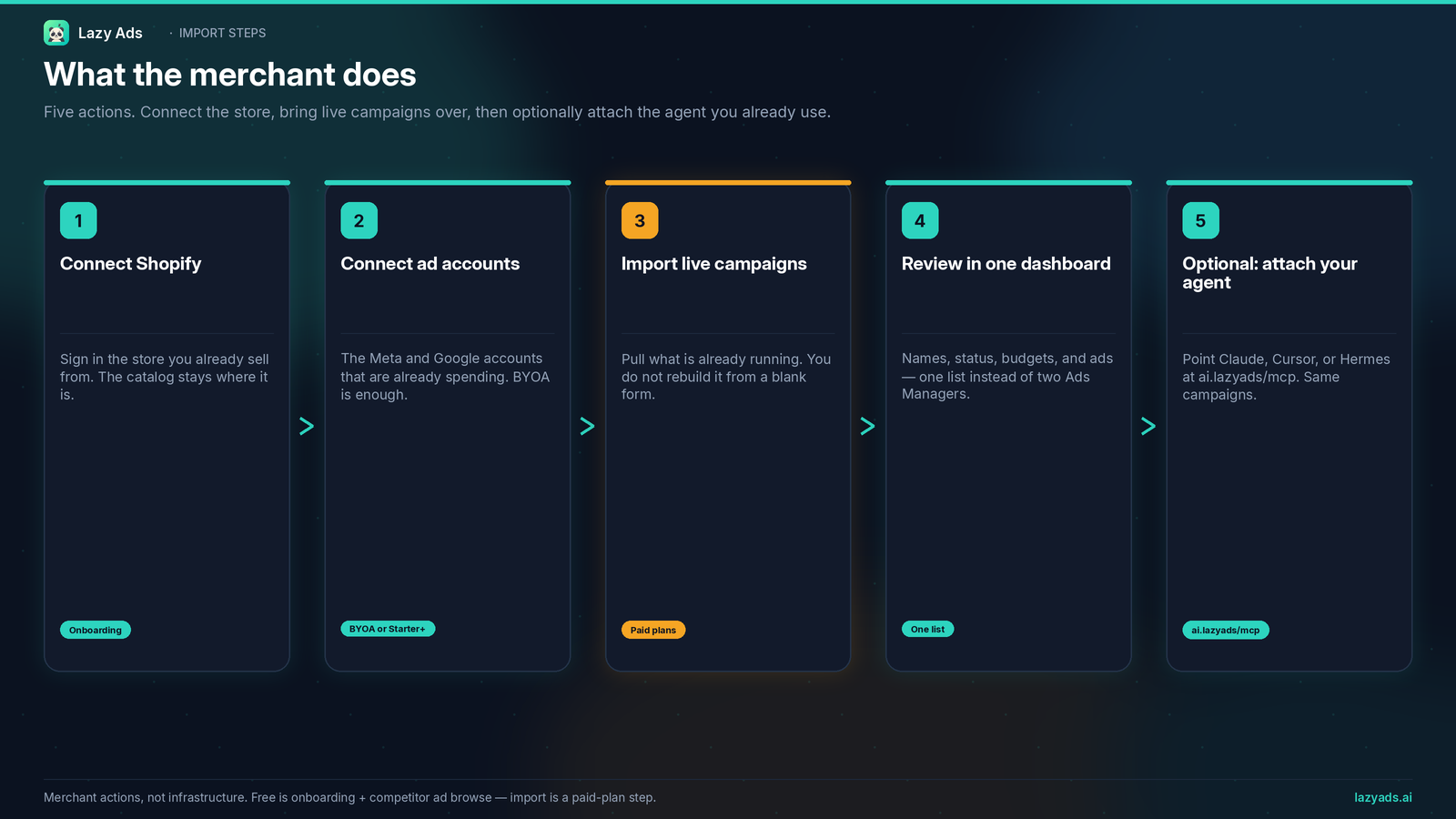
These are the merchant actions.
- Connect Shopify. Sign in the store you already sell from. The catalog stays on Shopify.
- Connect ad accounts. The Meta and Google accounts that are already spending. BYOA is enough to do this. Starter and above work too.
- Import live campaigns. Pull what is already running. You do not rebuild it from a blank form.
- Review in one dashboard. Names, status, budgets, and ads — one list instead of two Ads Managers.
- Optional: attach the agent you already use. Point Claude, Cursor, or Hermes at the hosted server. Official registry name:
ai.lazyads/mcp. Hosted athttps://mcp.lazyads.ai/mcp. Same campaigns. Same dashboard.
Free is not this list. Free is onboarding plus competitor ad browse. Free accounts have zero AI tokens. Import is a paid-plan step.
What comes over, and what you still set
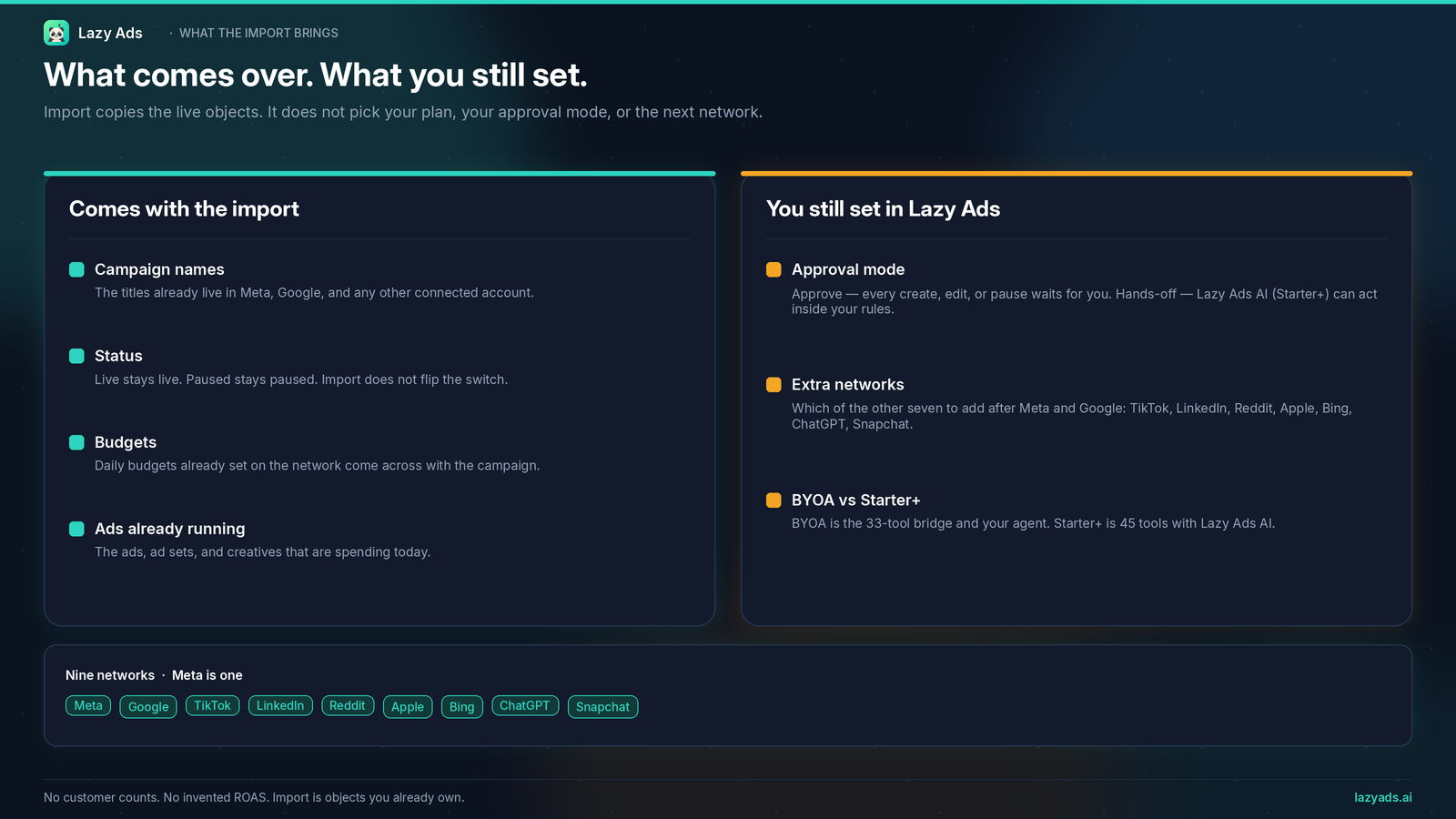
Import copies the live objects. It does not pick your plan, your approval mode, or the next network.
Comes with the import
- Campaign names — the titles already live in the connected accounts.
- Status — live stays live. Paused stays paused. Import does not flip the switch.
- Budgets — the daily budgets already set on the network.
- Ads already running — the ads, ad sets, and creatives that are spending today.
You still set in Lazy Ads
- Approval mode. Review First means every create, edit, or pause waits for you. Full Autopilot, on Starter and above, applies changes automatically. BYOA is the bridge for your agent, and its changes through the MCP apply right away.
- Which extra networks to add. Meta and Google are usually the first two. The product surface is nine: Meta, Google, TikTok, LinkedIn, Reddit, Apple, Bing, ChatGPT, and Snapchat.
- BYOA vs Starter+. BYOA includes the bridge set of 39 MCP tools that every paid plan gets, and no Lazy Ads AI. Starter includes the full set of 53 tools, with Lazy Ads AI. Import works on both. The plan decides who writes the next campaign, not whether the live ones can come over.
What happens when you import a live campaign
Four things happen, in this order.
- Lazy Ads lists what is live. It reads campaigns straight from each ad account you connected, including ones Lazy Ads has never seen. This works on all nine networks.
- You pick and import. Import links the campaign to your Lazy Ads dashboard. It does not pause it, edit it, or create a copy on the network.
- A sync fills in the rest. Lazy Ads pulls up to 90 days of daily performance and matches the ad sets and ads underneath, including ones built in Ads Manager before you arrived.
- Management stays off. The Lazy Ads optimizer does not touch budgets, bids, or ads on an imported campaign until you switch Management on for it. That switch is part of Lazy Ads AI, so it starts on Starter.
If a campaign is missing from the list, its ad account isn't connected or the connection lacks access. Lazy Ads records which permissions each connection has (view, create, publish, budget control), so check there first.
Shopify to ads is not an agency box
"Connect Shopify ad campaigns" is a search people type when the store is real and the ads are already on. Some tools answer that search by becoming the partner.
Marketer.com is the Shopify-agency box. One partner instead of a slow agency. Shopify plus Meta, Google, Snapchat, and ChatGPT Ads. Slack if you want the chat in their workspace. They run the operation; you keep a strategy seat. That is a real product. It is not this one.
Lazy Ads is the other shape. You keep the campaigns you already run. You keep the advertiser accounts. You keep the agent if you already have one. The store connects so the catalog is in the room. The import is so Meta and Google do not become a second spreadsheet.
We are not going to publish a comparison URL about it. The difference is the sentence: they take the account as a partner; we import what you already run and give you one dashboard — and, if you want it, a bridge for the agent you already pay for.
Nine networks is part of that sentence. A Shopify-first agency box that lights up Meta, Google, Snapchat, and ChatGPT Ads is four surfaces. Lazy Ads is Meta, Google, TikTok, LinkedIn, Reddit, Apple, Bing, ChatGPT, and Snapchat. You still need credentials on each one. You do not need a new partner to count them.
Nine networks after Meta and Google
Most Shopify stores that already advertise start on Meta and Google. That is fine. Import those first.
The dashboard is not a Meta-and-Google cage. After the import you can add TikTok, LinkedIn, Reddit, Apple, Bing, ChatGPT, and Snapchat — the rest of the nine. You add a network when you have the advertiser account, not because a homepage needed another logo.
Facebook and Instagram are placements under Meta, not two tiles. Do not look for X — it is not a tenth network.
A multi-platform dashboard is the system of record. Import is how a store with live work joins that record without a rebuild.
Dashboard or the agent you already use
Once the campaigns are in, you have two doors. They read the same objects.
The dashboard. Sync performance. Read spend. Pause or resume at campaign, ad set, or ad level. Move a daily budget. Duplicate a draft. Attach a creative you already have. Check whether the ad account can spend. That is the operator work, in one list.
Your agent. Bring your own agent is the $19 MCP bridge — $19/month billed annually, or $24 month-to-month. It includes the bridge set of 39 tools every paid plan gets. No Lazy Ads AI on our side. Claude, Cursor, or Hermes writes the next move. Lazy Ads executes it and syncs the result back so you are not hopping nine native managers for a spend read.
The hosted endpoint is https://mcp.lazyads.ai/mcp. It is listed on the official MCP Registry as ai.lazyads/mcp. Generate an API key at Settings → API Keys on a paid plan, then paste the block from lazyads.ai/mcp. If the client is Hermes, use the Hermes setup.
A first session after import should stay boring. List connections. List the campaigns Lazy Ads now knows. Sync. Pause one thing you already decided to pause. If those four calls work, the import and the bridge both work.
Plans
Public pricing cards:
- Free: onboarding and competitor ad browse. 0 AI tokens. Not a generated campaign. Not an import. Not an MCP key.
- BYOA: $19/month annual, $24 monthly. Bridge set of 39 MCP tools, which every paid plan gets. Import, create, edit, pause, monitor. One dashboard. Track up to five competitors. No Lazy Ads AI.
- Starter: $79/month annual, $99 monthly. Full set of 53 tools. Lazy Ads AI — campaign build, in-product chat, creatives against quota, competitor AI. Import is here too.
- Growth: $199/month annual, $249 monthly. Same full set of 53 tools, larger ad-spend sizing, A/B testing, REST API.
- Scale: $399/month annual, $499 monthly. Same suite, largest quotas, unlimited ad spend on the card.
MCP is not Growth-gated. BYOA has the bridge. Starter and above add Lazy Ads AI. REST starts at Growth. Do not buy Growth just to import a Meta campaign you already run.
Subscribe when you want the write path. Complete onboarding and competitor ad browse first. Then pick the shape: your agent on BYOA, or Lazy Ads AI on Starter.
FAQ
Can I import existing ad campaigns from Meta and Google?
Yes. Connect those advertiser accounts, then import the campaigns that are already live. Names, status, budgets, and ads come over. Import does not pause what is running.
Do I start over when I connect Shopify ad campaigns?
No. Connecting the store does not wipe Ads Manager. The catalog stays on Shopify. The live campaigns stay on Meta and Google until you import them. After you import them, they are still those campaigns, visible in one dashboard.
What does Shopify to ads mean here?
It means the store and the ad accounts share a workspace. Connect Shopify, connect the accounts that already spend, import what is live, then operate nine networks from one list. It does not mean a free AI rebuild of your catalog. Free has zero AI tokens.
Does the import cover all nine networks?
Yes. Import works on Meta, Google, TikTok, LinkedIn, Reddit, Apple, Bing, ChatGPT, and Snapchat. You import from the ad accounts you have connected, so you can start with Meta and Google and add the others once you have those advertiser accounts.
Is import on the free plan?
No. Free is onboarding and competitor ad browse. Import, the dashboard write path, and the MCP key are paid-plan features. BYOA is the first plan that matches "I already have campaigns and an agent." Starter is the first plan that matches "I want Lazy Ads to build the next one."
What is the difference between BYOA and Starter after I import?
Same imported campaigns. Different next step. BYOA ($19 annual / $24 monthly) is the bridge set of 39 tools every paid plan gets, and no Lazy Ads AI. Your agent writes the strategy. Starter ($79 annual / $99 monthly) is the full set of 53 tools on Starter and above, with Lazy Ads AI. Growth is $199 / $249. Scale is $399 / $499.
Will Full Autopilot start spending the moment I import?
No. Import does not change approval mode. You still choose Review First or Full Autopilot. In Review First, changes the Lazy Ads AI proposes wait for you. Full Autopilot is Lazy Ads AI on Starter and above. It applies changes automatically, and any budget increase is capped at 20% per optimization step. BYOA does not include Lazy Ads AI. Changes your agent makes through the MCP apply right away.
What happens to a campaign after I import it?
It keeps running the way it was. Import links it to your Lazy Ads dashboard, and a sync pulls up to 90 days of daily performance along with its ad sets and ads. Management stays off, so the Lazy Ads optimizer leaves budgets, bids, and ads alone until you switch it on for that campaign (Starter and above).
Do I have to rebuild my ads or creatives in Lazy Ads?
No. The ads and creatives stay on the network where you made them. A sync matches ad sets and ads that were built outside Lazy Ads, so the dashboard shows the structure you already see in Ads Manager.
Why can't I see a campaign in the import list?
The list reads live campaigns from the ad accounts you connected to Lazy Ads. If one is missing, connect the ad account it runs in, then check that connection's permissions. Lazy Ads records whether each connection has view, create, publish, and budget control access.
Start with the campaigns that are already live
If you wanted a blank campaign and a new strategist, this is the wrong first click. If you wanted to import existing ad campaigns — keep the Shopify store, keep Meta and Google, manage nine networks from one dashboard or from ai.lazyads/mcp — start with the live ones.
Finish onboarding. Browse competitor ads. When you want the import and the key, subscribe to BYOA for the bridge or Starter for Lazy Ads AI. Connect the store. Connect the accounts. Import what is already running. Then look at one list.
Start free onboarding and browse competitor ads, or subscribe to BYOA or Starter when you are ready.